Showing posts with label gift tags. Show all posts

17 Dec 2019

Tiny Tags from the Gnome Card by Simply Crafty SVGs


I never seem to have enough tags for my Christmas gifts and like to try a new style every year. This year I've used the gnome topper from the delightful Gnome Card SVG file from Simply Crafty SVGs.  It's fun and economical to use the topper from a card design, not only are you able to have matching cards and gift tags, but you get more use from the files that you purchase.

MODIFICATIONS:
To make this little guy I used most of the pieces from the gnome topper and added a few 'extras'.  I slightly increased the size of the gnome backing piece by making a small offset (to cut from metallic card), and then made separate 'feet' by duplicating and stretching the nose piece sideways slightly (to cut from black). Then I made all the pieces proportionately smaller and added a small circle to make a hole for some twine. Even in the smaller size the pieces all cut perfectly.

ASSEMBLY:
The pieces were quick to assemble, and were given some extra dimension with the selective use of some 3D foam pads. I added a teeny wee star left over from another project and threaded baker's twine through the hole. With some I added an additional scalloped circle behind. This makes the little gnome 'pop' and gives room to write a longer holiday greeting on the reverse.


I think this little guy looks great with the white and gold paper that I've chosen to wrap my gifts in this year. I might make a few more now with glittery beards and change out some of the colours. Why not try it and see what variations you can come up with?

Merry Christmas!

Janet, DT Member Simply Crafty SVGs

Blog: Crafting Quine
Instagram: @CraftingQuine


Files Used:
Simply Crafty SVGs Gnome Card


Other Digital Files: 
Scallop and Plain Circle Frames by Sarah Hurley (Studio or SVG)


9 Feb 2019

Using Glitter Vinyl on Paper - Gift Tags and Birthday Pop Ups


Using Silhouette Glitter Vinyl for giftware accessories and tags. Janet Packer, https://craftingquine.blogspot.co.uk for Graphtecgb aka Silhouette UK


Hello,  Today I have a new 'how-to' on the Silhouette UK Blog with some glittery gorgeousness. February is heavy on birthdays in our household so I love to assemble a stock of tags and gift wrap pretties to use throughout the month and beyond. I've used the Silhouette Glitter Vinyl to add that extra bit of sparkle - it works great on paper as well as on the more usual non-porous surfaces.

Using Silhouette Glitter Vinyl for giftware accessories and tags. Janet Packer, https://craftingquine.blogspot.co.uk for Graphtecgb aka Silhouette UK


Happy Birthday Pop Ups
I've used the glitter vinyl to enhance a few of these fun happy birthday popups using the file by Sweet Afton (#73618) from the Silhouette Design Store. This file can be used as it is, or, as I've done, added letters in glitter vinyl on top.

In the file, the letters aren't separate from the pop up strip. Over on the Silhouette UK blog I show how to cut them separately.

It includes my custom settings too.


Customisable Layered Gift Tags
I've also used the glitter vinyl to enhance some happy birthday gift tags. The file of pretty Cherry Blossom  tags by Nic Squirrell (#79029) from the Silhouette Design Store has three variations. By layering, and alternating the positives and negatives of the pieces cut from lavender textured cardstock and the glitter vinyl, I made even more. I added "Happy B'day" too using the CG Silent Night font by Carine Gardner (#236542).


I'm sold on the glitter vinyl. It very glittery, cuts beautifully and doesn't shed - perfect to use for special occasions of all types. I hope you'll try it.


15 Sept 2017

Acorn Girl Gift Tag


The new SVG cutting file release this week from Sanqunetti Design is this cute Acorn Girl file.

I made her into a simple shaped gift tag by welding a washer shape to the base piece. This was then tied to the little parcel with baker's twine with some Echo Park skeleton leaves from the Silhouette Design Store.


The tag was paper-pieced, and for speed and economy the tag and leaves were made using the Silhouette's Print & Cut feature on printable white card. The shapes shown in the picture below look quite thick, that's because they have an extra margin of colour (a gutter) around them, to ensure there are no white lines.


I also made my own wrapping paper for this gift using a seamless pattern and the colour changing options in the Silhouette's Image Effects panel. I was able to change the pattern from black to beige by playing with the Tint sliders.

I was pleased with how pretty the finished gift wrapping looked - great for fall birthdays or little thanksgiving or hostess gifts.


The file is available from Sanqunetti Design store.  Use my discount code 'JANET15' to received a 15% discount on this and other files in Judy's stores (can only be used when items are at full price).

I love finding ways to make gifts even prettier, don't you?


20 Mar 2017

Personalise a Children's Apron - a Quick design Tweak


Personalize a cut design by Janet Packer (CraftingQuine.blogspot.co.uk).  Make a personalised child's apron.


Hiya,

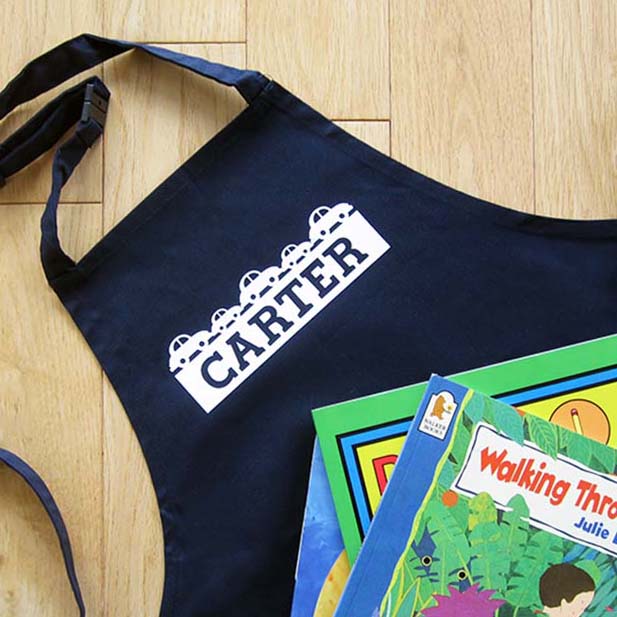
Kids seem to love gifts with their name on them,c  So, needing a gift in a hurry, I decorated this plain apron for a young friend who has a tiny bit of a car obsession, using a design from the Silhouette Design Store. I’m sharing a sep-by-step tutorial for this  quick and easy gift idea over on the Silhouette UK Blog today, using a child’s blank apron and flocked heat transfer material  (HTV) .


Personalize a cut design by Janet Packer (CraftingQuine.blogspot.co.uk).  Make a personalised child's apron.


The design I chose was from a set from the Silhouette Design Store called Baby Toys Borders Set designed by StudioIlustrado. The designer has loads of similarly sized borders with a rectangular base, any of which would work for this purpose. Just search the store for 'Borders set' and filter by 'Studioilustrado' (note, just one 'L') and it will bring up pages of lovely designs - including tractors, seahorses, and even kitchen sets.

I made a few minor adaptations to the file to incorporate the child's name and make a one-piece decal which makes it super easy to weed and align on a garment (or on a flat hard surface if regular vinyl is used). This would be ideal for anyone new to changing files, or to using heat transfer material. do pop over to the Silhouette blog and take a look.
Personalize a cut design by Janet Packer (CraftingQuine.blogspot.co.uk).  Make a personalised child's apron.

Firstly, I show how to edit the design to allow sufficient space for some text
Personalize a cut design by Janet Packer (CraftingQuine.blogspot.co.uk).  Make a personalised child's apron.
Then I type the child’s name in an easy-to-read font - Lori Whitlock’s Super Font


Personalize a cut design by Janet Packer (CraftingQuine.blogspot.co.uk).  Make a personalised child's apron.


Once reversed design is cut out on your digital cutting system (this would fit Silhouette®Cameo, Portrait or Curio) it is a straightforward design to iron or press onto the font of the apron.


Personalize a cut design by Janet Packer (CraftingQuine.blogspot.co.uk).  Make a personalised child's apron.

There you have it - add a matching gift tag and your gift is ready.

Of course, the same personalised design (not reversed) can be used on almost any hard surface too, using regular vinyl, so you could make even more co-ordinating items.

I hope you'll try it!